

Your data is no longer just for reading, now it's for listening: The Complete Guide to BrainBox Podcasts
We all have that Box full of PDFs, technical reports, and transcripts that we know we should review, but there's just no time. Reading a 50-page contract or technical manual requires a level of attention that simply doesn't exist in the middle of a busy workday.
I've been experimenting with BrainBox's podcast feature for weeks, and what has me hooked isn't just that it "makes audio." It's the amount of control you get over the result. It's not pressing a button and hoping for the best. It's deciding how you want it to sound, who speaks, how long it runs, and what they talk about.
In this guide I'll walk you through how it works step by step, so you can stop hoarding documents and start consuming them while you're driving, working out, or cooking.
What it actually does
Podcast generation in BrainBox turns the content of any Box into an audio conversation between multiple speakers. It's not a robotic voice reading bullet points. It's a structured script where several speakers discuss the key points of your documents, ask each other questions, and analyze the information from different angles.
And the best part: you're not limited to what the AI "thinks is important." With custom instructions, you tell it exactly what you want them to discuss. If you need them to focus on the legal risks of a contract or the commercial opportunities from a quarterly report, you just write it.
Step by step: From documents to audio
1. Choose your content
It doesn't matter if it's a single 100-page PDF or a collection of 20 files in different formats. Word, Excel, images with OCR, slides, source code, audio and video transcripts. BrainBox analyzes the entire context of your Box so the podcast is coherent, regardless of how many files it contains.
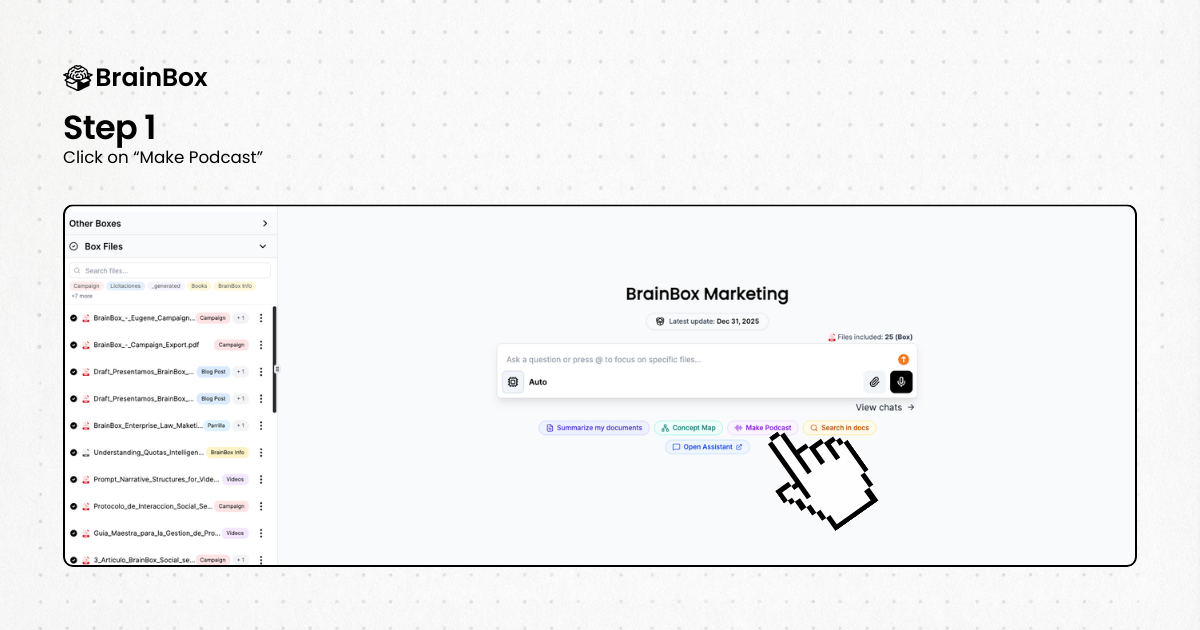
2. Configure it your way
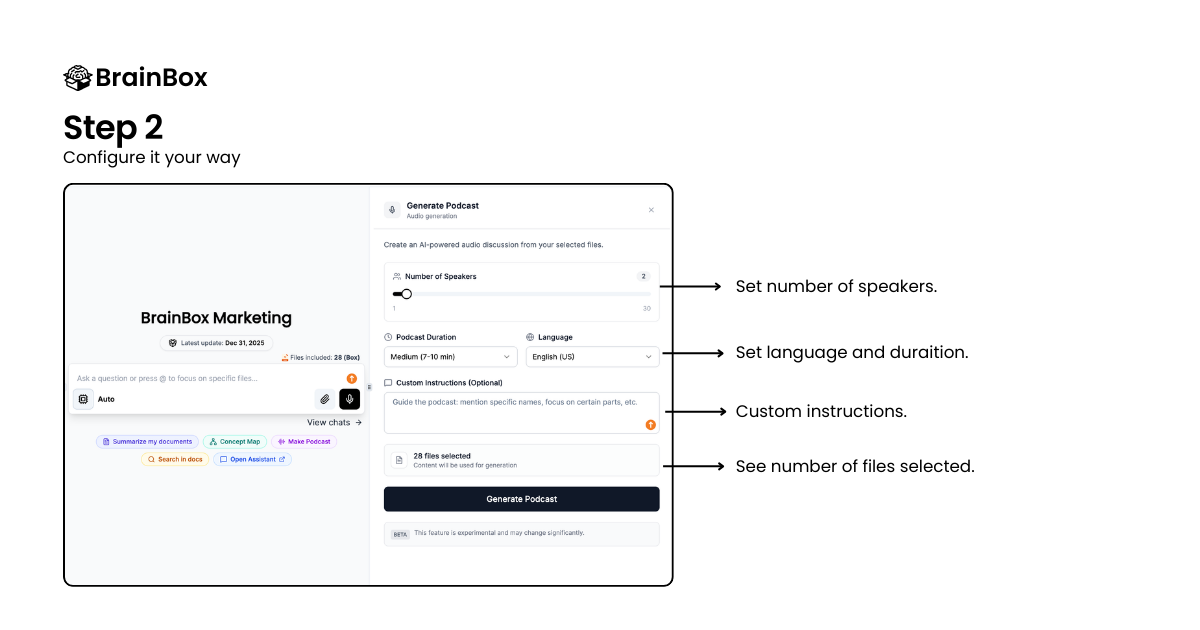
This is where it gets interesting. When you click "Make Podcast," a panel opens where you control everything:
Duration. Three options: short (2-3 minutes) for a quick summary, medium (7-10 minutes) for something deeper, or long (15-20+ minutes) if you want a full immersion into the content.
Speakers. You can choose between 1 and 30 people. And it's not cosmetic. A 2-person dialogue feels like an interview. With 3 you get a discussion panel. With 4 or 5 it's a roundtable where each voice brings a different perspective on the same content.
Files: You can select the specific files from your Box that you wish to include in the podcast. This allows you to create podcasts focused on relevant content, without needing to use all available documents. The selection is made in the left panel, where you choose your files.
Custom instructions. My favorite part. A free-text field where you tell the system exactly what you want. Some examples I've tried:
"Focus on the legal implications and use a formal but accessible tone."
"Make it sound like a casual chat between engineers at a coffee shop."
"Prioritize Q4 financial data and compare with the previous quarter."
"Explain it as if the audience were undergraduate students."
That completely changes the output. Asking for an executive summary is not the same as asking for a critical discussion.
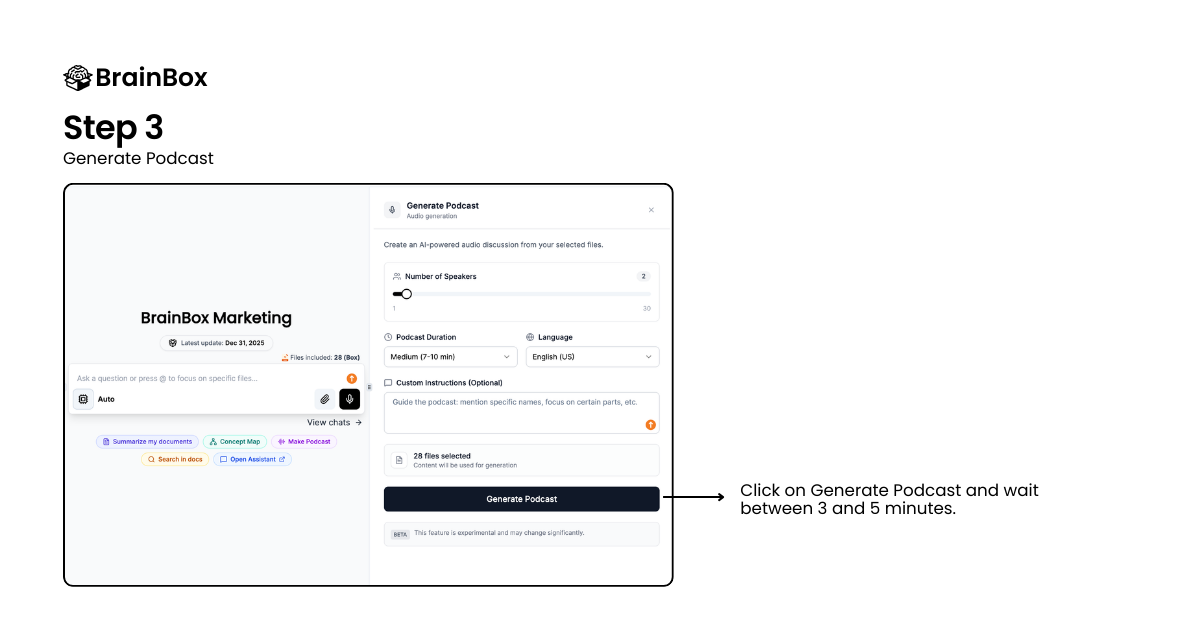
3. Generate and wait (not long)
Click generate and watch a real-time progress bar. A short podcast generates in under a minute. A long one can take between 3 and 5 minutes. Not instant, but you won't have time to go make coffee either.
4. Listen, download, or keep the conversation going
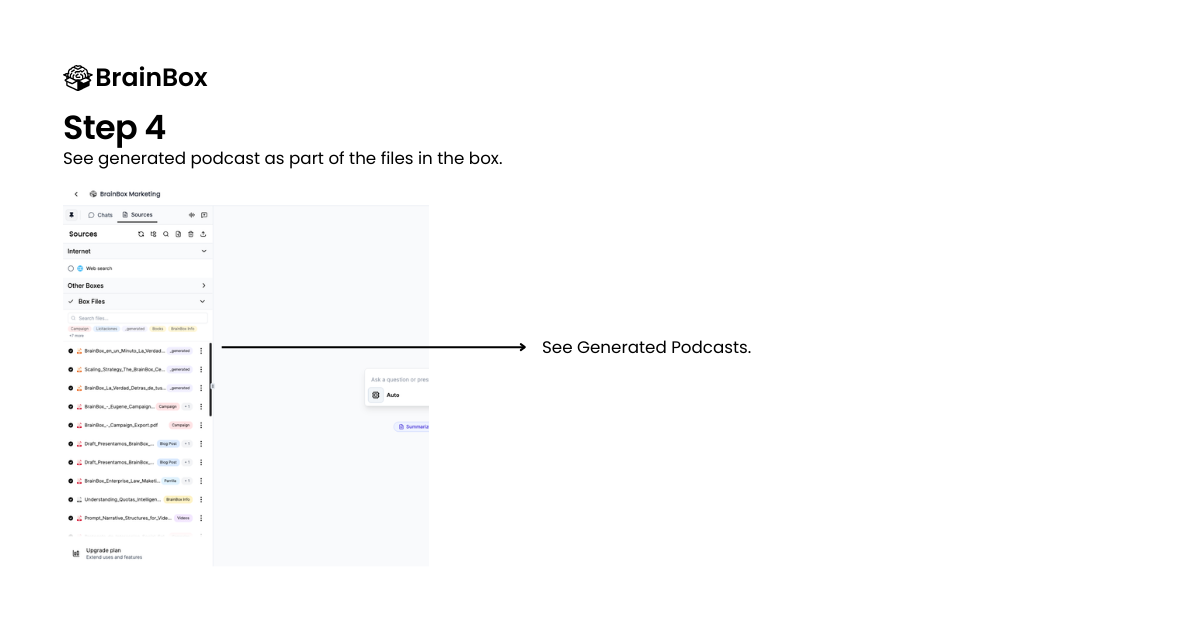
When it's done, the file automatically appears in your Box. You can play it directly from BrainBox with the built-in player, or download it to listen wherever you want.
But here's something I find particularly useful: the audio gets indexed in your Box like any other file. That means you can later ask the chat questions about what was discussed in the podcast, search for specific fragments, or use it as a source to generate other content. It's not a dead file you download and forget. It lives inside your knowledge ecosystem.
How much it costs to generate a podcast
The model is simple: approximately
1 Intelligence Unit (IU) per minute of generated audio
. A short 3-minute podcast is ~3 IU. A long 20-minute one, ~20 IU. No daily limits. If you have units available in your plan, you generate as many as you need, whenever you need them.
To put this in context, it's worth looking at how Google's NotebookLM works, which is probably the most well-known reference in AI audio generation:
BrainBox | NotebookLM Standard | NotebookLM Plus | NotebookLM Pro | |
|---|---|---|---|---|
Audio per day | No limit (IU-based) | 3 | 6 | 20 |
Speakers | 2 to 30 | 2 | 2 | 2 |
Available voices | 30+ | 2 | 2 | 2 |
Custom instructions | Full free text | Limited | Limited | Limited |
Configurable duration | 3 options (2-20+ min) | No precise control | No precise control | No precise control |
Direct download | Yes, one click | Not native | Not native | Not native |
This isn't about one being "better" than the other. They're different models. NotebookLM works really well for what it does and its two-host format is genuinely entertaining. But if you need more flexibility in the number of voices, granular control over instructions, or the ability to generate many audios in a single day without hitting a cap, BrainBox's intelligence-unit model gives you that freedom.
Also, if you already use BrainBox for document analysis, semantic search, report generation, or chatting with your sources, podcasts are a natural extension of what you're already doing. It's not another tool. It's another way to consume the knowledge you've already organized.
4 ways to use it tomorrow
New employee onboarding. Upload your company handbook, internal policies, and culture docs. Generate a medium podcast with instructions like "explain the policies as if you were a friendly coworker who's been at the company for 2 years." The new hire listens on their first commute. Much more human than handing them a 40-page PDF.
Meeting prep. You have a Box with relevant documents for a board meeting. Generate a short podcast 30 minutes before. It's faster than reading 5 documents and you arrive with fresh data in your head.
Technical training. Process documentation turned into 15-minute roundtables with 4 speakers. Each voice explores a different aspect of the process. Works as training material people can consume anytime, without having to sit down and read.
On-demand executive summaries. A legal team has a 200-page contract. Instead of asking someone to write a summary, generate a short podcast focused on risk clauses and main obligations. The partner listens on the way to court.
What you should know (unfiltered)
The podcast quality depends 100% on the quality of your documents. If you upload poorly structured or ambiguous files, the podcast will reflect that. Garbage in, garbage out.
The audio is generated in WAV format. Works perfectly for playback and sharing, but if you need MP3 for a specific platform, you'll need to convert it externally.
The voices are synthetic. They're very good and sound natural, but they're not real humans. If your use case requires the warmth of a studio recording with professional voice actors, this doesn't replace that. What it does replace is the cost and production time.
And there's no intermediate script editor. If you want to change something about the result, you adjust the custom instructions and regenerate. You can't edit the script line by line before converting it to audio.
Getting started
If you already have a BrainBox account, the podcast generator is available in any Box with indexed documents. You don't need to activate anything. It's not beta. It's a production feature ready to use.
If you don't have an account, you can create one for free at brainbox.com.co and start experimenting.
What I like most about this is that it closes a real gap: the distance between having documented information and that information being accessible to people who don't have the time to sit down and read. Not everyone learns the same way. Some learn better by listening. And now they have that option without anyone having to manually record anything.


